
Aarav
Chief of Staff
Turns what you want into a plan, hands every job to the right person and briefs you every morning.
Sineva Consulting · AI Office
Sineva AI Office is a team of AI employees you hire, name and watch work in a 3D office. They plan your Instagram, chase your leads, reorder your stock and answer your customers — and nothing is posted, sent or spent until you tap.
Thirty-three roles in eleven departments. Hire the ones you need, give them names, duties, tools and the AI they think with, and watch them work. These are some of them, and every one is an AI employee.
Chief of Staff
Turns what you want into a plan, hands every job to the right person and briefs you every morning.

Instagram Manager
Decides what to post, when and why, and drafts every post. Nothing goes live without your tap.

Sales Manager
Follows up every lead and writes the proposals and quotes. You send each message with a tap.

Graphic Designer
Designs posts, offer cards, carousels and ad creatives in your colours.

Community and Customer Care
Drafts warm replies to comments, messages and reviews, and flags anything sensitive to you.

Data Analyst
Reads your numbers and tells you what worked and why. If a number is not connected, he says so.

Personal Assistant
Keeps your tasks and reminders, briefs you every morning and sorts your email.

Paid Ads Lead
Reads ad spend and results every day, finds the waste and never spends without your tap.

Creative Director
Guards your brand. Every caption, design and video passes her first, and she says why when she holds one back.

WhatsApp Manager
Runs broadcasts, templates and replies, shows every message word for word and watches your number’s health.
The rule is built into the office, not left to the AI’s good behaviour. Every tool has a risk class, and anything that would post, send or spend becomes a card for you to approve.
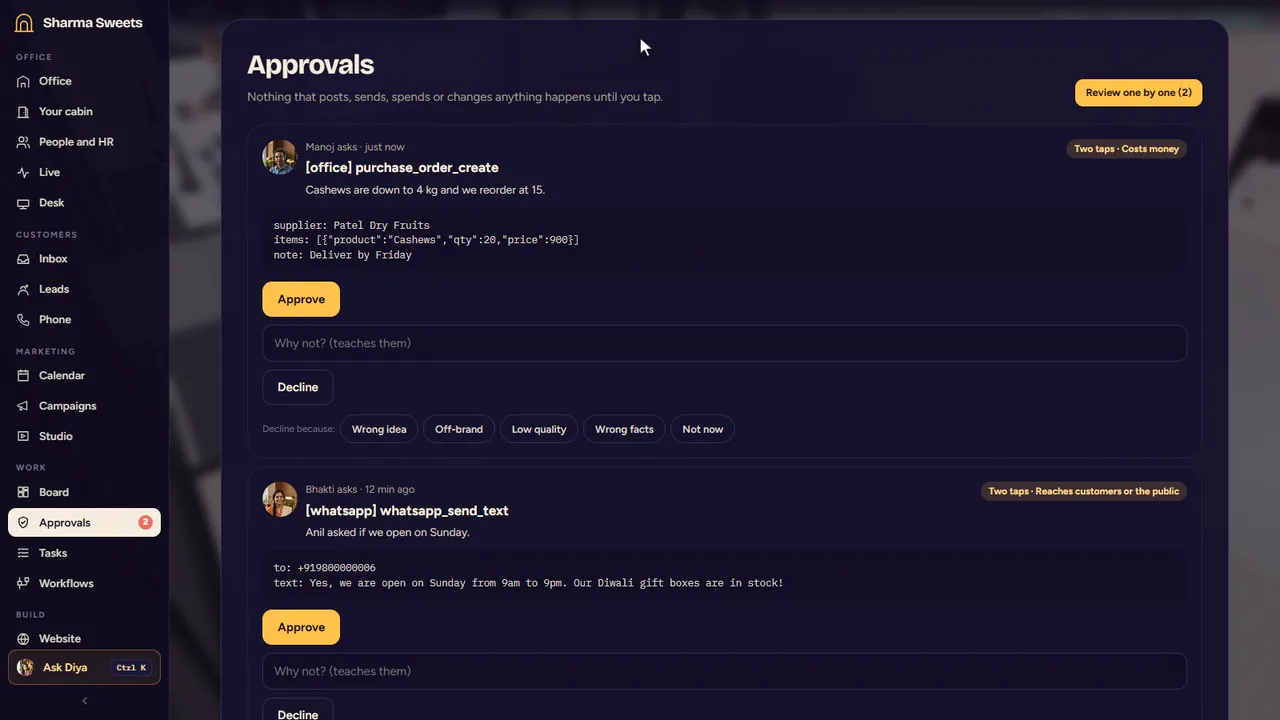
Nobody works until you say so. The team stays still until you press Start the team, and you can stop it whenever you like.
Anything that goes out is a card. Drafts and notes stay inside the office. Whatever posts, sends or spends becomes a card for you: one tap for a small change, two for anything that reaches customers, costs money or can’t be undone.
You can see how they work. Click anyone’s computer to see the task, every step and the draft as it is written.
Claims are checked. If a reply says something was done and no tool did it, the office catches it and asks again.
Declines teach. Say why in one tap, and that person keeps the lesson: it comes first in their training from then on.
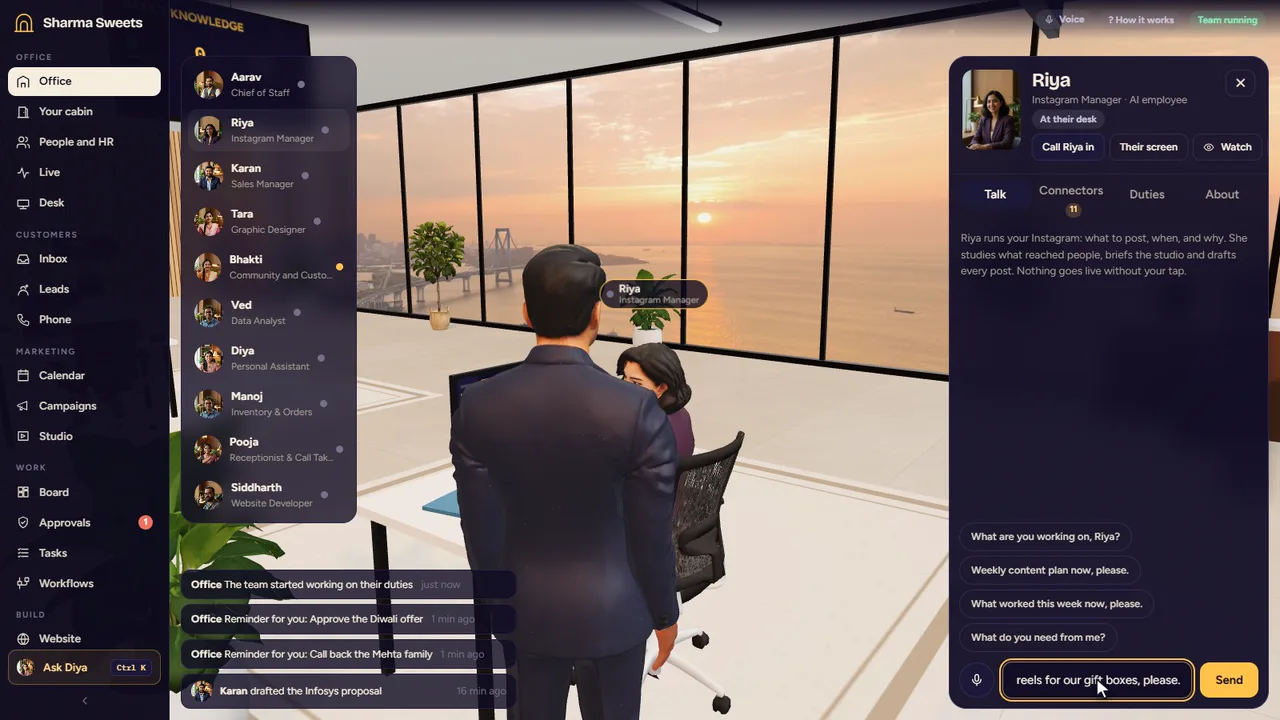
Type, speak, walk over to a desk or send a text. They answer in the language you write to them in, and tell you what they did.
Type it. Message anyone on the team, or ask your assistant from any screen with Ctrl K.
Say it. Press J for a hands-free phone line to anyone. Talk over them and they stop; ask for someone else and they put you through.
Call someone in. Take a person into your cabin for a one-on-one, or give them a job: they read it back to you first, then do it and report back.
Text it. Run the office from Telegram or WhatsApp. Ask for status, send a voice note, and approve with buttons.
The pages the team works in are yours too, and you can open any of them.
Leads. Every enquiry in one board, moved from new to won, with follow-ups and one-tap WhatsApp, call or email.
Calendar and campaigns. Plan posts, reels, emails and ads for the weeks ahead. Nothing publishes until you approve it.
Inbox and phone. WhatsApp, email and calls together, with the call log, recordings and summaries on each lead.
Stock and orders. Products, reorder levels and purchase orders, with low stock reported before it runs out.
Website and apps. Edits to your site are shown before and after and undone in two taps. Small apps are built and put live from the same place.
Video and pictures. A built-in maker for reels, posts and short videos in your brand’s colours, fonts and logo.
Workflows. When a new lead arrives or a call is missed, the team works through the steps you set, with your say-so where you want it.
The brain. Your business profile, notes, website and documents, searched with sources, on your own computer.
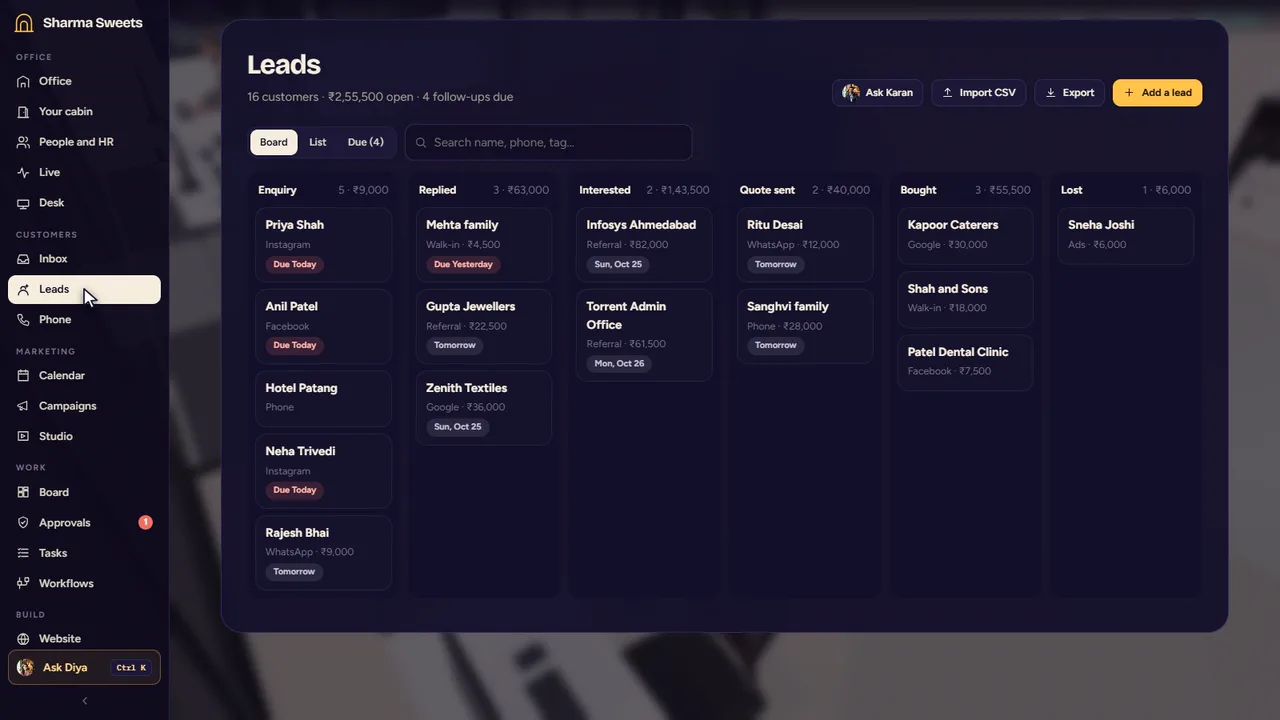
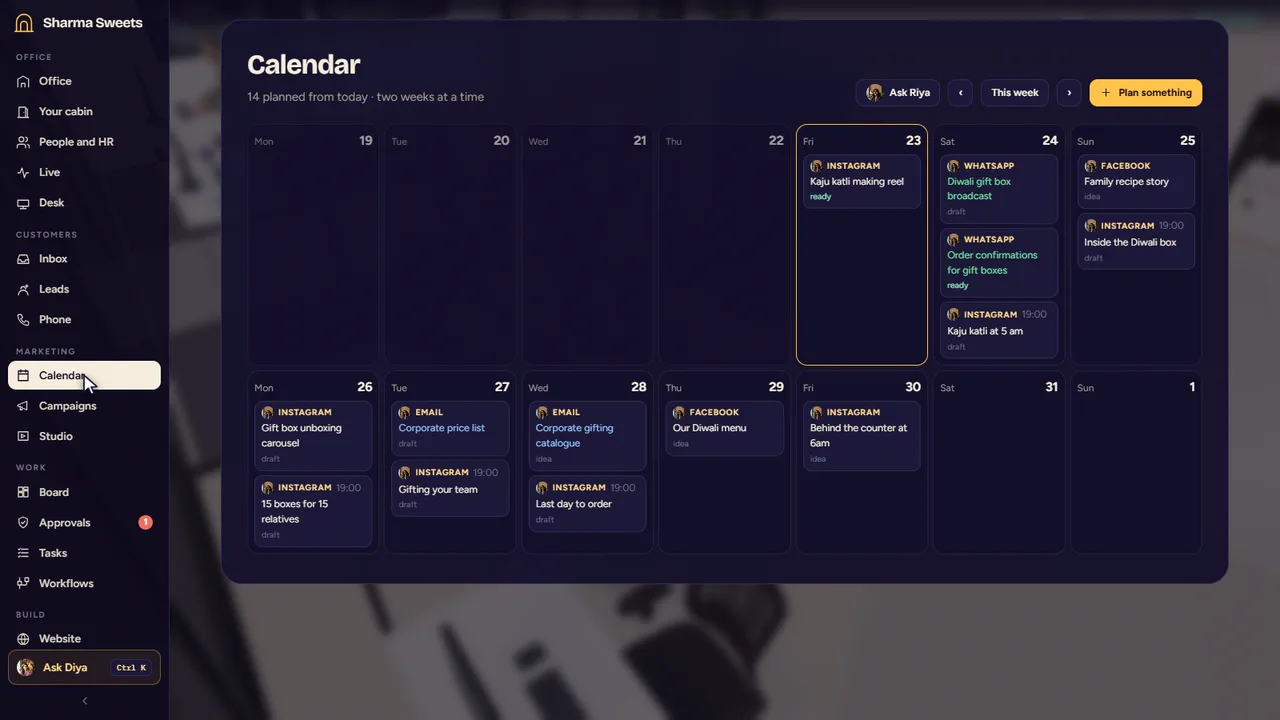
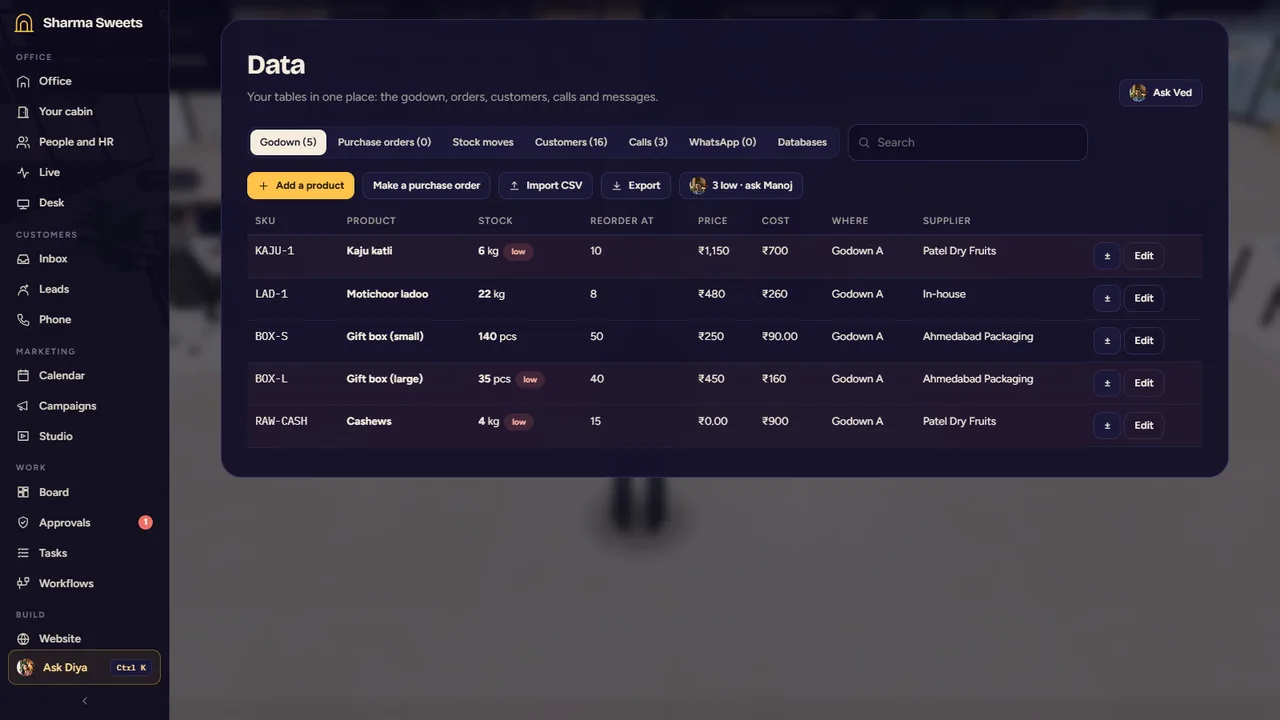
Pages shown with a sample business, Sharma Sweets.
149 connectors in 21 groups, and any API or MCP server you add. Each person sees only the tools you give them, and saved keys are encrypted and never shown to the AI.
Any AI
Choose the AI, person by person.
Twenty-seven providers, including Anthropic, OpenAI, Google Gemini, DeepSeek and Sarvam for Indian languages, or models that run on your own computer. Use your own account and see what it costs.
Where it runs
Your computer, your server, your phone.
On your Windows computer. A desktop app that lives in the tray, starts with the computer and keeps it awake while the team works.
In a browser, from your own server. The same office over the web, one for each business, so every customer has an isolated copy of their own.
On your phone. The office rearranges itself for a small screen. Scan a code on the same Wi-Fi, or put the web version on your home screen.
From a free call to a team that works for you.
Thirty minutes. Tell us about your business and we show you the office working.
What we would set up for you, and a fixed price, if you want to go ahead.
Your team, your tools, your AI and your rules, and training so your people know how to run it.
The team works and you approve with a tap. We are there when you need us.
A team of AI employees that you hire, name and watch work in a 3D office. You describe your business, it proposes the team, and the team handles marketing, sales, customer care, stock and reports, with you approving anything that goes out.
No. Nobody works until you press Start the team, and nothing posts, sends or spends until you approve it. Small changes take one tap; anything that reaches customers, spends money or can’t be undone takes two.
There are 33 roles in 11 departments, from Chief of Staff to Instagram, ads, sales, calls, WhatsApp, accounts, stock and your website. You hire the ones your business needs, from one person to a hundred.
Your choice, person by person, from 27 providers including Anthropic, OpenAI, Google Gemini, DeepSeek and Sarvam, or models that run on your own computer. You use your own account with the provider, so you see and control what it costs.
On a Windows computer as a desktop app, or in a browser from your own server, and on your phone. Your notes, leads and history are kept on your computer or your server. What a person needs for a task goes to the AI you chose for them, unless that AI runs on your own computer.
Saved API keys are encrypted and are never shown to the AI. Each person only sees the tools you give them. You can also share a read-only live view of the office, with customers’ names and numbers taken out.
No. Describe your business in a sentence and the builder proposes the office. We set it up with you and train your team.
After a free demo call you get a written quote. The AI itself is billed to you by the provider you choose.
Book a free demo call. We show you the office working and what it would do for your business.
A free demo call. Then a quote, if you want one.